Family apps carry a different kind of responsibility at launch. When your app is designed for parents, children, or household management, the people evaluating it are not just assessing features against a checklist. They are deciding whether to trust you with something that genuinely matters to them.
That trust gap is the central challenge of every family and parenting app launch – and it is not closed by a strong feature list or a polished UI. It is closed by how you communicate before a single download happens. Your launch announcement is the first place that communication occurs. Get the tone, the transparency, and the messaging right, and you begin that relationship on solid ground. Get any of them wrong, and parents move to the next app in the search results without looking back.
This guide covers every element of a family app launch on Android that earns parental trust from the first sentence – from how you open your press release to what your specifications block must include to why the quote you choose changes everything.
1. Lead With the Family, Not the Features
The most common mistake developers make when writing about a family or parenting app is opening with technology. “AI-powered,” “smart algorithm,” “machine learning,” “adaptive engine” – these phrases do not resonate with a parent searching for a screen time manager, a chore chart app, or a family meal planner. They signal that the developer is more interested in the engineering achievement than in the daily reality the app is supposed to improve.
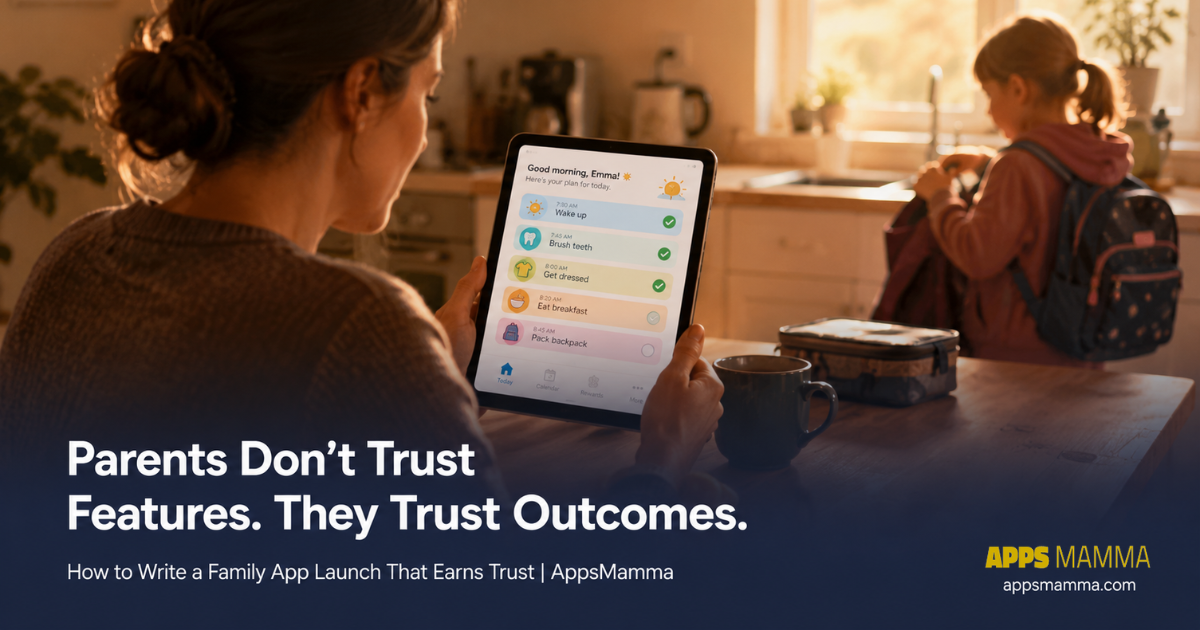
Parents do not think in features. They think in outcomes. What – does a Tuesday morning look like after they have been using your app for two weeks? argument disappears? routine becomes automatic? does their child do differently?
Compare these two openings for the same hypothetical app:
Feature-led opening (weak): “KidRoutine uses an adaptive scheduling algorithm to generate personalised daily routines for children aged 3 to 12.”
Outcome-led opening (strong): “KidRoutine helps parents build consistent morning and bedtime routines for young children – reducing daily battles over screen time and giving kids a visual schedule they can follow independently.”
Same app. Completely different emotional landing. The second version describes a recognisable moment in a real parent’s day. It makes the parent think “that is my Tuesday morning.” That recognition is what drives the download decision – not the algorithm.
Your announcement lede should describe a before and after from a family’s real experience. Technology is the how. The outcome is the why. Lead with why, consistently, in every public-facing piece of launch copy you write. For reference on how the strongest family app announcements read in practice, browse our parent app coverage – the apps that generate the most reader engagement are consistently those that open with the family’s experience, not the developer’s engineering choices.
2. Privacy and Safety Are Not Fine Print – They Are Headlines
In the general app world, a privacy policy link is a legal checkbox that most users scroll past without reading. In the family app world, it is a primary evaluation criterion that parents read before they read anything else – and the absence of clear privacy language in your announcement is read as a red flag, not an oversight.
Parents are acutely aware that their children’s data, screen time patterns, location, and digital behaviour are sensitive in ways that adult personal data is not. Any app that handles any of this – even indirectly, even in aggregate – needs to address data handling in the press release itself, not in a linked policy document that most readers will not follow.
Your announcement should explicitly state every one of the following:
- Whether the app collects any data from or about children – and if so, precisely what data and for what purpose
- Whether it complies with COPPA if targeting the US market, GDPR-K if targeting Europe, or the equivalent regulation in your primary launch region
- Whether any data leaves the device, and if so, where it goes, who has access to it, and how long it is retained
- Whether the app requires parental account creation before any child profile is established
- Whether in-app purchases are gated behind parental authentication – and what that authentication mechanism is
These are not optional disclosures for a parenting app press release. They are the questions every parent who reads your announcement is asking. A family app launch that does not address privacy in the announcement itself signals that privacy was an afterthought in the development process – and that perception, once formed, is difficult to reverse with a policy document link in the footer.
3. Get Coverage on the Right Platforms – Both of Them
Family app press coverage exists across two overlapping but distinct worlds, and a launch that wants genuine reach needs both of them working together.
Parenting blogs, family lifestyle sites, and mum-and-dad communities are the obvious target audience for a family app – but their readers are broad-intent browsers, not always in active “download something new today” mode. Android tech press reaches a fundamentally different audience: parents who are specifically looking at what is new on the Play Store right now, reading app reviews as part of an active discovery habit.
When your family app is listed and covered on AndroidNewswire – a dedicated Android press platform that serves both developers and Android-focused readers – it sends a specific signal to the tech press and to informed parents that your app is a legitimate, reviewed product with editorial credibility behind it. Using their dedicated App Launch Service ensures your app is positioned and distributed to exactly the right editorial audience from day one. That third-party coverage from an Android-specific platform carries weight that your own Play Store description and parenting blog mentions cannot replicate on their own. Parents who encounter editorial coverage before downloading are significantly more likely to leave a review, share the app with other parents, and remain engaged long enough to become genuine advocates.
Build your distribution list to include both channels from the start. Parenting platforms reach the audience who needs convincing that the app is right for their family. Android press reaches the audience who is already actively looking for their next app download. Neither channel substitutes for the other in a well-structured family app launch. AppsMamma’s family app reviews consistently draw readers from both audiences – parents who arrived via parenting content and Android users who arrived via tech search – which is exactly why the apps that perform best in this space are the ones that seeded both channels before launch.
4. The Quote Should Come From a Parent, Not Only a Developer
Every press release includes a developer quote. It is expected. It is also almost never what changes a parent’s mind.
A developer saying “we built this because we wanted to help families” is the expected thing a developer says. A parent saying “this is the first app that actually made our bedtime routine something my daughter looks forward to” is evidence. These are not the same kind of statement, and parents read them very differently.
For a family app press release specifically, include a second quote from a parent or caregiver who used the app during your beta period. You do not need a formal testimonial collection process. After your beta runs, send five parents a single question: “In one or two sentences – what specifically changed about your day because of this app?” Use the most specific, most honest response you receive as a pull quote in your announcement, attributed by first name and role only (example: “Sarah, mother of two, Chennai” or “Marcus, father of three, London”).
That single addition transforms your press release from a developer’s product announcement into a family’s story. Editors who commission parenting content look for exactly this kind of human, specific voice when deciding which apps to feature. It is often the difference between an app receiving a brief mention in a roundup and receiving its own dedicated feature article.
5. Age Range and Household Context Are Essential Specifications
Generic app announcements describe the target audience in the broadest possible terms – “for families” or “for parents and children.” A family app announcement needs to be precise about who exactly this app serves, because “family” is an enormous category that covers wildly different situations, challenges, and technology comfort levels.
In your app specifications block, include every one of the following details explicitly:
- Target child age range: State it specifically – “designed for children aged 4 to 10” or “suitable for teenagers 13 to 17.” A parent of a 4-year-old and a parent of a 14-year-old are looking for completely different solutions
- Who operates the app: Parent-only control / Parent and child shared use / Child-operated with parental oversight – each of these represents a fundamentally different product for a parent evaluating download suitability
- Household use case: Single-child household, multiple children with different ages, co-parenting across two homes, classroom or group use – the specificity helps the right parent immediately self-identify as the intended user
- Device requirements: Runs on the child’s device / Parent’s device only / Syncs across both – a parent who only has one family device needs to know this before downloading
- Offline capability: Full offline use / Partial / Requires connection – particularly relevant for travel, school commutes, and households with variable connectivity
These specifications do two things simultaneously. They help editors write accurate, useful articles without emailing you for clarification. And they help the right parent instantly recognise that this app is built for their specific situation – which is the moment the download decision is effectively made.
6. Tone: Warm, Clear, and Genuinely Jargon-Free
A family app press release should read like it was written by someone who has actually spent unhurried time with children – not by someone optimising for developer forums or tech press who will forgive abbreviations and passive voice.
Practical tone guidelines that apply to every sentence you write:
- Use short sentences. Parents read between interruptions, during nap times, and while half-watching something on television. Long, nested sentences lose them
- Avoid every acronym and technical abbreviation unless you define it immediately in the same sentence
- Use “children” and “parents” throughout – not “users” and “end users.” The moment you write “end user,” you have left the family context and entered a product documentation context that parents do not relate to
- Remove “leverage,” “synergy,” “disrupt,” “ecosystem,” and “frictionless” from every draft before it leaves your screen
- Test each paragraph against this question: could a tired parent reading this at 10pm understand it without effort? If not, rewrite it until they can
The app you built is designed to make family life genuinely easier, calmer, and more connected. The announcement should feel exactly the same way. An announcement that reads like a B2B software spec sheet will not convert parents who were ready to trust you but found the language too clinical to feel safe in.
The Family App Launch Announcement Checklist
| Element | Status | Why It Matters |
|---|---|---|
| Opening paragraph leads with a family outcome, not a technology feature | Required | Parents decide in the first two sentences whether to keep reading |
| Privacy and data handling explicitly addressed in the announcement body | Required | Its absence is read as a red flag, not an oversight |
| Safety and compliance statements included – COPPA, GDPR-K, or regional equivalent | Required | Establishes regulatory credibility before a parent asks |
| Published on both parenting platforms and Android tech press | Required | Two different audiences at two different stages of the download decision |
| Developer quote plus at least one parent beta tester quote included | Required | The parent voice is what converts other parents – developer voice alone does not |
| Age range, household context, and device requirements in specifications block | Required | Precision helps the right parent self-identify as the target user immediately |
| Tone reviewed for warmth and clarity – no jargon, short sentences, human language throughout | Required | Clinical language breaks trust with the audience that trusts on feeling first |
Family apps earn loyalty when parents feel, from the very first contact, that the developer genuinely understands what a family’s day looks and feels like. Your press release is the first opportunity to demonstrate that understanding. An announcement that gets this right does not just inform – it reassures. And for a category where trust is the primary purchase criterion, reassurance is the product.
AppsMamma covers family, parenting, and lifestyle apps across Android and iOS. Our parenting app reviews and children’s learning app coverage serve an audience of parents who are actively looking for exactly what you have built. Submit your app via our contact page – and bring your best parent quote with you.
Frequently Asked Questions
Does a parenting app really need to address privacy in the press release, or is the policy link enough?
The policy link is never enough for a family app audience. Parents evaluating an app for their children’s use will not click through to a linked policy document during an initial announcement read – but they will immediately notice the absence of any privacy language in the announcement itself and interpret that absence as a signal that privacy was not a primary consideration in development. Address the four or five key privacy questions directly in the body of your press release. Reserve the full policy document for the Play Store listing and your app’s settings screen.
What is the most important difference between a family app press release and a general app press release?
The trust infrastructure. A general app announcement needs to communicate what the app does and why it is better than alternatives. A family app announcement needs to do all of that and additionally communicate that the developer understands the specific sensitivity of the audience – children and the parents responsible for them. Every element of a family app announcement – the opening, the privacy disclosures, the parent quote, the age-range specifications, the tone – exists to build that trust infrastructure before the parent reaches the download button.
How do I find parent beta testers willing to provide a testimonial quote?
The most reliable source is your own beta group – parents who have been using the app for two to three weeks and have had a genuine experience with it. Ask them one specific question: “In one or two sentences, what specifically changed about your day because of this app?” Specific prompting produces specific answers. A parent who answers “our bedtime routine used to take 45 minutes of negotiation. Now it takes 15 and my son initiates it himself” has given you a better testimonial than anything you could write. Use it with their first name and parenting context only – no surnames, no photographs without explicit consent.
Should I launch a family app on Product Hunt in addition to Android press platforms?
Product Hunt is worth including as part of your web presence strategy, but it is not the primary discovery channel for Android family app downloads. Product Hunt’s audience skews toward early adopters and tech professionals evaluating products for personal and professional use – not parents in active download mode looking for a children’s app. Your primary Android-facing launch effort should be directed at Android press platforms, parenting content sites, and category-specific communities where parents of children in your target age range are already active. Product Hunt can be a secondary channel, not the lead.
How do I submit my family or parenting app to AppsMamma for review?
Contact us through our contact page with your app’s Play Store link, your press release (or draft), a parent beta tester quote if you have one, and a clear note on the target child age range and household use case. Apps that arrive with this context prepared receive priority consideration in our parent app review queue. We cover Android and iOS family apps across all categories – parental control, education, household management, children’s entertainment, and parenting support tools. Include your privacy and data handling summary directly in your submission email – we check it before we check anything else.
AppsMamma covers the best family and lifestyle apps for Android and iOS. Our editorial team reviews apps independently, with a particular focus on privacy, age-appropriateness, and genuine family utility. Submit your app for review via our contact page.